
📞 Now Available: AI Voice Receptionists Can Transfer Live Calls
AI Workforce (also known as Conversations AI)
Our AI Voice Receptionist just got a major upgrade — it can now transfer live calls directly to the right person or department based on the rules you set. If your plan includes AI Workforce, this feature is now available to you. If not, contact Celia to add it to your Capital Valley Marketing service package.
Never Put a Customer on Hold Again
Complex phone trees and long hold times frustrate callers. With live call transfer, your AI Voice Receptionist can instantly route incoming calls to the correct contact, creating a smooth and professional experience every time.
Provide the Human Touch When Needed
This update helps simplify customer engagement by ensuring callers reach the right person quickly — whether it's for billing questions, urgent needs, appointment requests, or reaching a specific team member.
This update allows our clients to benefit from:
• Faster call handling
• Improved lead qualification
• More personalized customer experiences
How It Works
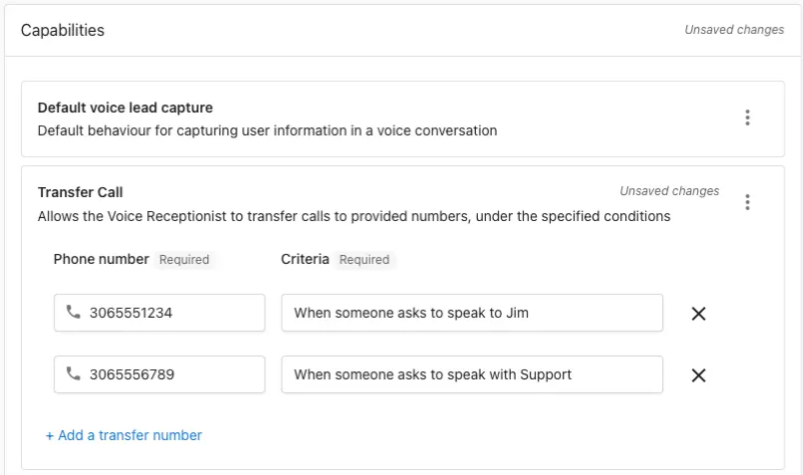
Your AI Voice Receptionist can transfer calls to one or multiple phone numbers based on conditions you set.
To configure this feature, go to:
Business App → AI → AI Workforce → Voice Receptionist → Configure → Capabilities → Add a capability → Transfer Call
With this new capability, you can set routing rules such as:
• Route by Department/Function: e.g., “billing,” “sales,” “support.”
• Route by Employee Name: Perfect for businesses with dedicated client reps.
• Route by Location: Ideal for franchises or multi-location businesses.
• Route by Urgency: Escalate emergency situations quickly.
• Route by Schedule/Time: Send calls to different contacts based on business hours.
• Route by VIP/Account: Recognize key clients and route them to their account manager.
• Route by Language: If a caller requests Spanish (or another language), send them to the appropriate person.
If you'd like this added to your plan, contact Celia and we’ll help you get set up.
FAQs
How many numbers can the AI forward calls to?
There is no limit — you can set up as many transfer numbers as needed.
Can call forwarding work only during specific times or days?
Yes. You can apply conditions based on day, time, or business hours. The AI is aware of the current date and time.
Will the transferred portion of the call be recorded or transcribed?
No. Recording ends at the moment the call is transferred.
If the transferred call isn’t answered, will the AI jump back in?
No. Once the call is transferred, it stays with the receiving number. The caller would need to dial back to return to the AI.
