
Tired of Chasing Leads? How Local Service Businesses Can Build a Reliable Lead Pipeline

If your leads come in waves, busy one week, silent the next, you are not alone. Most local service businesses depend too much on referrals, inconsistent ads, or seasonal demand. This creates stress, unstable revenue, and constant chasing.
A reliable lead pipeline is built through repeatable systems, not luck. When your marketing works on autopilot, bringing in inquiries every week, you stop reacting and start planning.
What Is a Reliable Lead Pipeline for Local Businesses?
A reliable lead pipeline means you consistently get qualified inquiries without daily effort. It combines multiple channels, like search, ads, and referrals, working together instead of relying on just one.
Most local businesses misunderstand this. They think “more leads” means running more ads. In reality, a pipeline is about predictability. You should know roughly how many calls or form fills you’ll get each week. This stability allows you to manage staff, pricing, and growth with confidence.
A strong pipeline also filters out poor-quality leads. The goal is relevance. When your messaging and targeting are aligned, you attract people who are ready to hire, not just browse.
Why Are You Always Chasing Leads Instead of Attracting Them?
You are chasing leads because your marketing depends on effort, not systems. If leads stop when you stop posting, running ads, or asking for referrals, your setup is reactive.
Here are common reasons this happens:
No strong online presence in local search
Overdependence on word-of-mouth
No tracking of where leads come from
Poor website conversion (people visit but don’t contact)
Inconsistent messaging across platforms
Many businesses spend money on ads without fixing these basics, which leads to wasted budgets and frustration. The problem isn’t effort, it’s structure.
The Foundation: Build Visibility Where Customers Are Already Searching
Your priority is showing up where people are actively looking for services. This means local SEO, not just a website.
Key areas to focus on:
Google Business Profile (GBP)
Your GBP listing is the first thing customers see. Keep it updated with:
Correct contact details
Regular posts
Reviews and responses
Service descriptions
Local SEO Content
Create pages for each service and location. A single “services” page is not enough. Search engines prefer specific pages like:
AC repair in your city
Emergency plumbing near in your area
Review Strategy
Reviews influence both ranking and trust. Ask for them immediately after service completion, not days later. Many businesses skip consistency here. A strong local presence alone can reduce your dependence on paid ads over time.
Why Your Website Might Be Losing You Leads
A website should convert visitors into inquiries. If it doesn’t, even high traffic won’t help.
Here’s where most service websites fail:
Slow loading speed
No clear call-to-action
Too much text without direction
Missing trust signals (reviews, certifications, guarantees)
Complicated contact forms
A simple fix: every page should answer three questions quickly:
What do you offer?
Where do you offer it?
How can someone contact you right now?
Also, place contact buttons at multiple points, not just at the bottom. Many users won’t scroll that far.
How Paid Ads Fit Into a Predictable Lead System
Paid ads help you control lead flow when used correctly. They are not a replacement for SEO; they support it. The key is intent-based targeting.
Google Ads for High-Intent Leads
People searching “emergency electrician near me” are ready to act. These clicks are expensive but convert well.
Retargeting Ads
Not everyone converts on the first visit. Retargeting reminds visitors about your service and brings them back.
Budget Allocation Tip
Instead of spreading your budget across many campaigns, focus on:
1–2 high-performing services
1 geographic area
The Role of Content in Building Long-Term Leads
Content works as a long-term lead generator by answering customer questions before they reach out. Instead of relying only on ads or referrals, well-planned content brings in people who are already searching for solutions. Topics like service pricing in your city, warning signs that a service is needed, or when to choose a professional over a DIY approach help attract users at different stages of decision-making.
One practical insight many businesses overlook is the impact of pricing content. Even though companies hesitate to share costs, providing a realistic price range helps filter serious buyers and improves conversion rates. When users find clear, useful answers on your site, they are more likely to contact you with confidence instead of continuing their search elsewhere.
Why Tracking Leads Is Non-Negotiable
If you don’t track your leads, you cannot improve your pipeline.
You should always know:
Where each lead came from
Which campaigns are profitable
Cost per lead and cost per conversion
Use tools like:
Call tracking numbers
Form tracking with analytics
CRM systems to monitor follow-ups
Many local businesses rely on guesswork. They continue spending on channels that feel productive but don’t actually convert. Data removes that confusion.

Turning One-Time Customers Into Repeat Lead Sources
A reliable pipeline doesn’t just bring new customers, it maximizes existing ones.
Here’s how:
Follow-Up Systems: Send reminders for maintenance services or repeat needs.
Referral Incentives: Offer small rewards for referrals. Even a discount on the next service can work.
Email or WhatsApp Updates: Stay in touch with past customers. Share tips, seasonal offers, or service reminders.
Most businesses ignore this step. That means they keep spending to acquire new customers instead of using the ones they already have.
Consistency Beats Intensity in Lead Generation
Many businesses go all-in for a short period and then stop. This leads to sudden spikes followed by long dry phases, making revenue unpredictable. Lead generation works best when it is treated as an ongoing process instead of a one-time push. Think of your pipeline as a system that needs regular maintenance. Consistent actions, even if small, create stable and long-term results.
Weekly Content Updates
Publishing useful content every week keeps your website active and improves your visibility in search results. It also gives potential customers more entry points to discover your services.
Monthly Ad Optimization
Ad campaigns need regular adjustments. Review which keywords, locations, and ads are performing well. Shift your budget toward what brings actual leads, not just clicks.
Regular Review Collection
Consistent reviews improve both credibility and local rankings. Ask for reviews after every completed service. Respond to each review to show engagement.
Continuous Website Improvements
Your website should evolve based on user behaviour. Track which pages get traffic and which ones convert. Update calls-to-action, simplify forms, and improve page speed.
When Should You Stop Doing It Yourself?
You should consider expert help when your time spent on marketing starts affecting your ability to run your core business. Managing ads, content, and lead follow-ups alone can limit your growth and lead to burnout.
Signs you need support include:
Leads are inconsistent despite effort
If you are putting in time but still seeing unpredictable results, it means your strategy lacks structure or proper targeting.
You don’t know which channel works best
Without clear tracking, it becomes difficult to identify where your leads are coming from. This leads to inefficient spending and missed opportunities.
Your ad spend is increasing without results
Rising costs without better conversions indicate poor campaign setup or a lack of optimization. This is a common issue when ads are managed without expertise.
You lack the time to manage campaigns properly
Marketing requires regular monitoring and adjustments. If you cannot dedicate time to it, performance will drop over time.
Working with specialists allows you to focus on delivering your services while they build and manage systems that bring in consistent leads. This shift helps create a stable pipeline without constant manual effort.
FAQs
How long does it take to build a reliable lead pipeline?
It usually takes 3–6 months to see consistent results. SEO takes time, while ads can bring faster leads. The best approach combines both for short- and long-term gains.
Is SEO better than paid ads for local businesses?
Both serve different purposes. SEO builds long-term visibility, while ads provide immediate leads. A balanced strategy works best.
How many leads should a local business aim for each month?
This depends on your service capacity and conversion rate. Instead of chasing numbers, focus on qualified leads that turn into paying customers.
Do small businesses need a CRM system?
Yes, even a simple CRM helps track leads and follow-ups. It ensures no potential customer is missed and improves conversion rates.
What is the biggest mistake in lead generation?
Relying on a single channel. If that source stops, your entire pipeline collapses. Diversification is key.
Build a System That Brings Leads to You
Chasing leads is exhausting and unsustainable. A reliable lead pipeline gives you control, stability, and growth without constant effort. By combining local SEO, a conversion-focused website, targeted ads, and proper tracking, you create a system that works even when you’re not actively chasing customers.
If you want a structured, results-driven approach, Capital Valley Marketing helps local service businesses build predictable lead pipelines that bring consistent inquiries and real growth.
Never Miss a Lead Using AI Webchat and Voice Receptionists

Many businesses lose valuable leads not because their marketing fails, but because inquiries go unanswered or responses arrive too late to matter.
AI webchat and voice receptionists ensure every visitor and caller is acknowledged instantly, capturing intent and context before interest fades.
By supporting faster engagement, better qualification, and smoother follow-ups, AI reception helps businesses convert more leads without overloading their teams.
Leads don’t arrive when it’s convenient. They come in during lunch rushes, after office hours, while your team is in meetings, or when no one is watching the inbox closely enough. And in those moments, silence is expensive. Most businesses don’t lose leads because their marketing isn’t working. They lose them because response time breaks down somewhere between interest and action. A form goes unanswered. A call goes to voicemail. A chat window sits idle just long enough for someone to leave. That gap is where modern businesses either fall behind or move ahead.
Here is how AI webchat and voice receptionists are helping businesses capture every opportunity, respond instantly, and turn attention into actual revenue.
1. The Real Cost of Missed Leads Isn’t Always Obvious
Before talking about technology, it’s important to understand what actually happens when a lead slips through the cracks.
Here is what missed responses quietly cost businesses every day.
a) Speed Is the New First Impression
When a website chat goes unanswered, or a phone call hits voicemail, the assumption isn’t “they’ll call me back.” It’s “they’re busy” or worse, “they’re not serious.” That first impression shapes the entire buying decision.
AI webchat and voice receptionists remove that delay. Every visitor gets an instant response, even if your human team is unavailable. That alone changes how your brand is perceived.
b) Leads Don’t Wait Around
Most prospects don’t fill out one form or make one call. They reach out to multiple businesses at once and choose whoever responds first with clarity and confidence.
By the time your team gets back to a missed call or unread chat, the decision may already be made. AI reception tools eliminate that timing risk by engaging leads the moment they show intent.
That difference is often the difference between winning the lead and never knowing you lost it.
c) Missed Leads Skew Marketing Data
When leads go unanswered, your data becomes misleading. Campaigns appear underperforming. Ads seem less effective. Traffic feels lower quality than it actually is.
In reality, interest exists. The follow-through doesn’t.
AI-powered chat and call handling ensure that marketing performance is measured accurately because every inquiry is captured, logged, and responded to consistently.
d) Teams Burn Out Trying to Keep Up
Human teams aren’t designed to be available 24/7. When businesses try to force round-the-clock responsiveness manually, quality drops and burnout rises.
AI reception tools act as support, not a replacement. They handle first touch conversations so your team can focus on meaningful follow-ups, conversions, and service delivery.
This is where businesses begin to see AI not as automation, but as part of a sustainable AI workforce that works alongside humans instead of exhausting them.
e) Opportunity Loss Adds Up Quietly
One missed lead might not feel significant. Ten in a month might go unnoticed. Over a year, that silent loss becomes substantial.
AI webchat and voice receptionists aren’t about chasing volume. They’re about respecting every opportunity that shows up and making sure it gets acknowledged properly.
That consistency turns small moments of interest into long-term growth rather than missed potential.
2. How AI Webchat and Voice Receptionists Actually Work in Practice

The idea of AI handling conversations can sound abstract until you see how it functions day to day. Here is how these tools support real business operations without feeling robotic or impersonal.
a) AI Webchat That Responds Like a Real Assistant
Modern AI webchat doesn’t just pop up with generic greetings. It understands context, asks relevant questions, and guides visitors based on intent.
Whether someone wants pricing, service details, scheduling information, or basic answers, the chat adapts accordingly. It collects lead information naturally, without friction.
Most importantly, it never leaves a visitor waiting. This immediate engagement keeps visitors on the site longer and increases the chances that curiosity turns into a real conversation. It also reduces bounce rates caused by uncertainty or lack of direction.
b) Voice Receptionists That Answer Every Call
AI voice receptionists ensure that every incoming call is answered professionally, even outside business hours.
Instead of voicemail, callers are greeted, guided, and directed. Information is captured accurately, and urgent inquiries can be routed appropriately.
This maintains professionalism and reliability without requiring a live staff member to be available at all times. It also reassures callers that their inquiry matters, even if they’re reaching out after hours or during peak business times.
c) Seamless Handoffs to Human Teams
The goal isn’t to trap leads in automation. It’s to prepare them.
AI tools gather context before passing conversations to your team. That means when a human steps in, they already know who the lead is, what they’re asking for, and how serious their intent is.
This creates smoother conversations and faster conversions. It also removes repetitive back-and-forth, allowing your team to focus on solutions instead of information gathering.
d) Consistency Across Every Touchpoint
Humans have good days and tired days. AI systems don’t.
Every lead receives the same level of attention, tone, and clarity regardless of time or channel. Website visitors and callers experience the brand consistently, which builds trust without extra effort.
This consistency becomes especially valuable when businesses roll out an upgraded marketing plan and want every channel to perform reliably. It ensures that no matter where a lead comes from, the first interaction feels intentional and on-brand.
e) Smart Learning Over Time
AI reception tools improve with use. They learn from interactions, refine responses, and adapt to common questions and patterns.
Over time, this creates a smarter front-line experience that feels less scripted and more intuitive, while still staying on brand. The system becomes better aligned with how real customers speak, ask questions, and make decisions.
3. Why Businesses Using AI Reception Convert More Leads
Capturing leads is only part of the story. The real value lies in what happens next. Here is why AI-supported businesses consistently see stronger conversion results.
a) Faster Engagement Builds Trust Immediately
Speed signals professionalism. When leads receive instant responses, they feel acknowledged and valued. That emotional response plays a major role in whether someone continues the conversation or moves on.
AI tools ensure that no lead ever feels ignored, even briefly. This early reassurance often sets the tone for the entire relationship that follows.
b) Better Qualification Before Sales Steps In
Not every lead is ready to buy. AI reception helps filter and qualify inquiries before they reach your team.
This means your sales conversations are more focused, more relevant, and more productive. Teams spend time on people who are actually interested, not just browsing. It also reduces friction by ensuring prospects are met at the right stage of readiness.
c) Improved Follow-Up Timing
Because every interaction is logged and categorized, follow-ups happen faster and with better context. No more guessing who called or why. No more delayed responses because information was missing. Everything is structured and ready when your team steps in. This clarity makes follow-ups feel intentional rather than reactive. It also helps teams reach out while interest is still high, when conversations are most likely to convert.
d) Stronger Brand Perception Without Extra Staffing
AI webchat and voice receptionists allow businesses to appear larger, more organized, and more responsive than they might actually be internally. This doesn’t mislead customers. It reassures them.
It shows that the business values communication and respects its time, which strengthens long-term brand trust.
e) A Foundation for Scalable Growth
As marketing efforts increase, lead volume grows. Without AI support, teams hit capacity limits quickly.
With AI reception in place, growth becomes manageable. Systems scale before stress sets in.
This is why businesses working with a trusted marketing partner increasingly view AI reception as a strategic layer, not a temporary tool.
Where Lead Capture Becomes a Competitive Advantage
AI webchat and voice receptionists aren’t about replacing human connection. They’re about protecting it. They ensure that interest is acknowledged, conversations begin smoothly, and no opportunity disappears simply because no one was available at the right moment. In a market where attention is fleeting and expectations are high, responsiveness becomes a competitive advantage. Businesses that respond first, respond clearly, and respond consistently are the ones that win.
Capital Valley Marketing helps businesses stay responsive, relevant, and ready the moment a lead shows interest. Get in touch to explore how AI webchat and voice receptionists can become part of a stronger, more responsive growth strategy.
📣 New Weekly Newsletter Launched!
We’re excited to share that Capital Valley Marketing has officially launched our Weekly Marketing Newsletter — created to help small business owners stay ahead without the overwhelm.
We’re excited to share that Capital Valley Marketing has officially launched our Weekly Marketing Newsletter — created to help small business owners stay ahead without the overwhelm.
What You Can Expect Each Week
Our newsletter is designed to be quick, helpful, and packed with value. Every issue includes:
• ✨ Tip of the Week – Practical, easy-to-apply marketing advice you can implement right away.
• 📈 Marketing Insights – Trends, tools, and strategies to help you grow steadily and sustainably.
• 🧰 CVM Tools & Updates – New features, improvements, and behind-the-scenes transparency about how we’re serving you better.
• 🎓 Upcoming Workshops & Events – Stay in the loop on all CVM webinars, trainings, and live sessions.
• 💡 Real-World Examples – Success stories, case studies, and mini walk-throughs of marketing systems in action.
Our goal?
To help you stop chasing customers and start building steady, system-driven growth — the kind that keeps your calendar (and your cash flow) full all year long.
How to Subscribe
You can join the newsletter anytime by visiting the bottom of our homepage at:
We’re excited to bring you consistent, transparent communication and weekly support — right in your inbox.
✨ Product Update: Smarter AI Comment Replies + New Pexels Image Library (Social Marketing Only)
These new features are available to all Capital Valley Marketing clients who use the Social Marketing platform. Social Marketing’s AI-powered Suggest Reply now uses deeper context to help create sharper, more on-brand responses to social media comments.
These new features are available to all Capital Valley Marketing clients who use the Social Marketing platform. If you're interested in upgrading, please contact us for details.
💬 Smarter, More Contextual AI “Suggest Reply” Responses
Social Marketing’s AI-powered Suggest Reply now uses deeper context to help you create sharper, more on-brand responses to comments on your social posts.
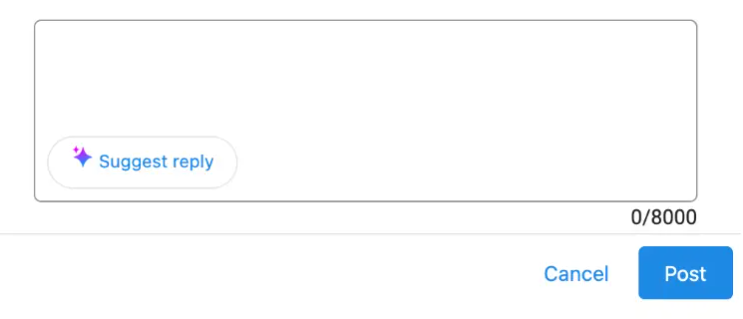
What’s New
More context, automatically: Suggested replies now incorporate:
• AI Knowledge
• Social Post Instructions
• Original post content
• Comment content
• Your business context
Updated settings: You can edit your AI context under:
Business App → Social → Launch → AI Settings
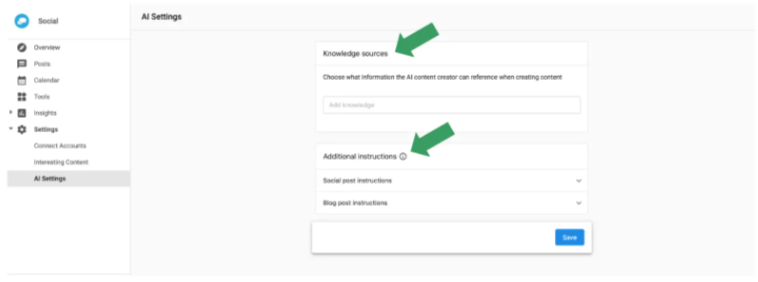
Why It’s Important
• Sharper, smarter replies that better match your brand voice.
• Stronger contextual understanding so replies feel natural and aligned.
• Consistent quality across all interactions.
• Increased efficiency with faster, more accurate AI responses.
🖼 New: Pexels Image Integration
You now have direct access to Pexels’ entire library of high-quality, royalty-free images right inside Social Marketing — no extra downloads or apps needed.
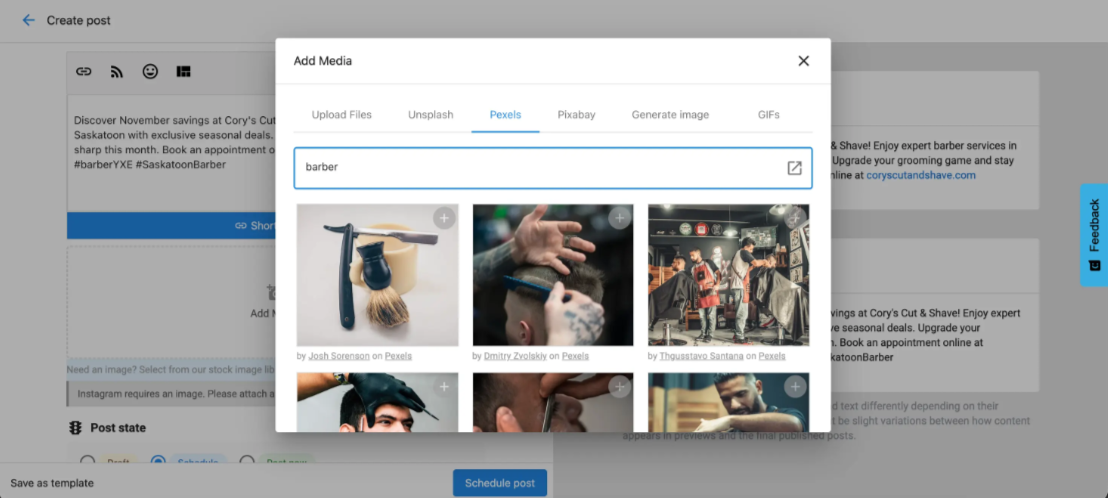
Why It’s Important
• Browse high-quality images directly inside the platform.
• Save posts as drafts so you can plan ahead with selected visuals.
• Schedule and publish easily, complete with professional, eye-catching imagery.
Who Has Access?
These updates are included automatically for CVM clients subscribed to the Social Marketing program.
If you aren’t using Social Marketing yet but want access to AI-powered replies, built-in content planning tools, and the new Pexels library, reach out to Celia to upgrade your package!
We’re here to help you build steady, system-driven marketing that keeps your calendar (and your cash flow) consistent all year long.
📱 New Automation Upgrade: Send SMS Alerts to Any Phone Number
When something important happens in your business, the right people need to know immediately. This update allows you to send SMS notifications to any phone number directly from Automations—not just CRM contacts.
When something important happens in your business, the right people need to know immediately. This newest update makes that easier than ever. You can now send SMS notifications to any phone number directly from Automations—not just CRM contacts.
It’s a small feature with big ripple effects, especially for busy teams and business owners who live in motion.
What’s New in Automations
Send SMS to anyone who needs to know
You can now alert:
• Teammates
• Front-desk or on-site staff
• Yourself
• Partners
Even if they aren’t stored as a CRM contact.
Personalize each message
Dynamic fields let you pull in details such as:
• Lead name
• Form content
• Message text
• Appointment details
So every notification arrives with context, not confusion.
Customizable for nearly any workflow
Designed for fast-moving businesses that need quick visibility across sales, service, fulfillment, or support.
Why This Matters
Email gets buried. Platform notifications get missed. But SMS cuts through the noise.
This upgrade makes communication more dependable, especially for small business owners who spend more time in trucks, job sites, and customer homes than behind a desk.
Before this update, SMS alerts could only go to CRM contacts, limiting visibility. Now, alerts can reach whoever needs them, the moment something happens. It’s a game-changer for response time and customer experience.
How to Get Started
This feature requires Conversations AI | Pro.
To add SMS alerts to any automation:
Open the Automation Builder
Choose a trigger (form submitted, webchat lead captured, missed call, etc.)
Add Send an SMS message to a phone number
Enter the number(s) you want alerted
Personalize the message using dynamic variables
And that’s it. Your workflow now has instant SMS visibility built in.
If you’d like help setting up smart notifications or building a frictionless lead-response system, Capital Valley Marketing can guide you through it. You deserve steady business, not random moments of panic checking inboxes.
📞 Smarter, Smoother AI Voice Receptionist
We’ve rolled out several behind-the-scenes improvements to our AI Voice Receptionist, making it more accurate, more reliable, and easier for clients to customize. These updates are designed to create better caller experiences while giving you clearer visibility and control.
We’ve rolled out several behind-the-scenes improvements to our AI Voice Receptionist, making it more accurate, more reliable, and easier for our clients to customize. These updates are designed to create better caller experiences while giving you clearer visibility and control.
🔧 Easier Management of AI Automations
Managing how your AI Receptionist and other AI team members work together just got simpler. We can now quickly see and manage every automation connected to a specific AI employee. That means faster adjustments, fewer errors, and smoother performance across your marketing and customer communication systems.
📞 Improved Out-of-the-Box Call Performance
The AI Voice Receptionist now comes with an improved default setup that delivers clearer, more natural conversations right away. It’s ready to perform from day one, while still allowing us to fine-tune responses to match your business voice and customer expectations.
🗣 Fully Customizable Opening Greeting
Your greeting sets the tone, and now it’s completely customizable. We can tailor what callers hear at the beginning of every call to reflect:
• Your brand personality
• Any required privacy or compliance language
• Your preferred language or phrasing
This ensures every call feels intentional, professional, and on-brand.
🧠 More Context, Better Conversations
The AI Voice Receptionist now understands more real-time context during calls. This means:
• Less repetition
• Fewer awkward loops (like repeatedly asking for the same information)
• Smoother, more human-like conversations
Your callers get helped faster, with less friction.
💬 Automatic WhatsApp Follow-Ups (Optional)
For businesses using AI Voice calling, we can now automatically trigger a WhatsApp follow-up message after a call using a pre-approved template. This is perfect for confirmations, next steps, or friendly follow-ups—without adding manual work to your plate.
Tired of chasing down new customers every month?
You deserve steady business, not random sales. With Capital Valley Marketing, these AI tools aren’t just tech upgrades—they’re part of a bigger system designed to keep your calendar (and your cash flow) steady all year long.
If you’d like to explore adding or upgrading an AI Voice Receptionist, or want help customizing it for your business, just let us know—we’re happy to walk you through the options.
✉️AI Chat Receptionist Now Replies to Emails Automatically
Another big step toward never missing a lead. Capital Valley Marketing’s AI Chat Receptionist can now reply to customer emails automatically, delivering fast, helpful responses 24/7—no matter when someone reaches out.
Another big step toward never missing a lead.
Capital Valley Marketing’s AI Chat Receptionist can now reply to customer emails automatically, delivering fast, helpful responses 24/7—no matter when someone reaches out.
That means no more inbox gaps, delayed replies, or missed opportunities when your team is busy or offline. Every inquiry gets acknowledged, immediately.
What’s New
🟦 Instant Email Responses—Automatically
Your AI Chat Receptionist can now respond to inbound emails just like it already does for chat and messaging channels.
Once enabled:
• Customers receive a friendly first reply within minutes
• Emails are answered any time of day (yes, even nights and weekends)
• The full conversation is logged alongside your other messages for easy visibility
Everything stays organized in one place—no hunting through inboxes.
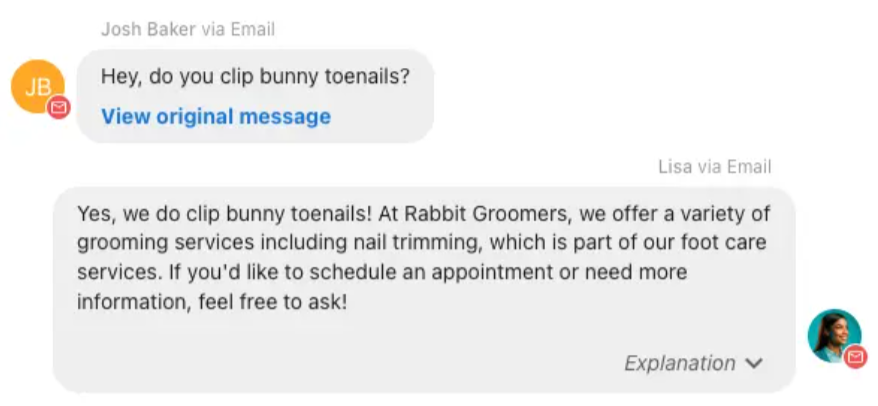
Why This Matters
Email is still one of the most common ways customers reach out. But when teams are stretched thin, first responses often get delayed—and delayed responses can mean lost business.
Until now, email conversations could be sent and received, but they couldn’t be automatically answered by AI. With this update, email officially joins the list of channels your AI Receptionist can manage instantly.
That means:
• Faster response times
• Better first impressions
• Fewer missed leads
• Less manual follow-up for your team
Channels Supported by the AI Chat Receptionist
Your AI Chat Receptionist can now automatically respond to customer messages across:
• Website chat
• SMS (US & Canada)
• WhatsApp
• Facebook Business Messages
• Instagram Business Messages
• Email (NEW!)
Note: At this time, automatic email responses are available only through the AI Chat Receptionist, not custom AI employees.
Getting Started
This feature is available now and can be enabled as part of your AI Workforce setup.
CVM can handle setup for you, or if you’re managing it internally:
• Email responses are enabled within your AI Chat Receptionist settings
• Branded email addresses can be configured for a seamless, professional experience
• Advanced email settings allow customization and testing
Once active, the AI begins responding immediately.
Customizing Email Responses
Want your email replies to sound just right? No problem.
We can guide the AI with instructions such as:
• Tone and formality preferences
• What to include (next steps, booking links, contact info)
• What not to say in certain situations
This ensures your email responses stay aligned with your brand and customer experience goals.
In Summary
With automatic email responses, your AI Chat Receptionist now helps you:
• Respond instantly to email inquiries—24/7
• Keep all conversations visible in one place
• Improve lead response times without adding staff hours
• Create a smoother, more reliable customer experience
Tired of chasing down new customers every month?
You deserve steady business, not random sales. This update helps ensure every inquiry is acknowledged, every opportunity is captured, and your calendar stays full—without burning out your team.
If you’d like help enabling this feature or want CVM to manage setup and optimization for you, just let us know.
✨ Custom AI Employees Now Available
Custom AI Employees are now available for creation, unlocking Vendasta’s AI Employee framework for Partners and local businesses. This update allows users to design, train, and deploy AI Employees tailored to real business processes using their own knowledge, documents, systems, and rules.
New Feature: Custom AI Employees
Custom AI Employees are now available for creation, unlocking Vendasta’s AI Employee framework for Partners and local businesses. This update allows users to design, train, and deploy AI Employees tailored to real business processes using their own knowledge, documents, systems, and rules.
What Custom AI Employees Can Do
Custom AI Employees are designed to support real operational roles and deliver consistent, reliable work without repeated prompting or context rebuilding. Use cases include, but are not limited to:
• Job Estimators that generate accurate quotes using live pricing, service tiers, or historical job data
• Project Managers that pull details from connected systems and send automated customer updates
• Sales Enablement Assistants that answer internal questions using current policies and product knowledge
• Payment Coordinators that monitor failed payments, follow up with customers, and take action based on predefined business rules
All roles operate within a shared knowledge base and connected systems, ensuring every interaction reflects how the business actually works.
New Ways to Create & Deploy AI Employees
Custom AI Employees: Getting Started
Partners and Business App users can now create multiple Custom AI Employees directly within the platform. While Vendasta’s AI Employee framework has supported customization for existing AI Employees, this release enables full creation, training, and deployment of custom roles.
New Deployment Options
This release introduces expanded ways to interact with AI Employees:
• Internal Chat with AI Employees
Team members can chat directly with Custom AI Employees inside the Vendasta platform (AI Workforce tab) for quoting, internal support, SOP lookups, project coordination, and more.
• Embedded Web Chat Experiences
Add inline, embedded chat experiences on any webpage (not limited to floating widgets) to enable guided interactions, resource navigation, and richer on-page support.
• Buttons That Trigger AI Employee Chats
Launch AI-powered conversations from any website button, ideal for calls-to-action such as “Get a Quote,” “Ask a Question,” or “Book Now.”
These enhancements expand where and how AI Employees can operate, making them more accessible to both internal teams and customers.
Availability & Requirements
Creating Custom AI Employees in Business App requires an active subscription to an AI-enabled SKU. At launch, eligible subscriptions include:
• Conversations AI — Standard, Pro, and Premium
• Reputation Management — Premium
• Social Marketing — Pro
Additionally, all Partners with a Professional subscription or higher (or legacy equivalents) can create Custom AI Employees in Partner Center.
📞 Now Available: AI Voice Receptionists Can Transfer Live Calls
Our AI Voice Receptionist just got a major upgrade — it can now transfer live calls directly to the right person or department based on the rules you set. If your plan includes AI Workforce, this feature is now available to you.
AI Workforce (also known as Conversations AI)
Our AI Voice Receptionist just got a major upgrade — it can now transfer live calls directly to the right person or department based on the rules you set. If your plan includes AI Workforce, this feature is now available to you. If not, contact Celia to add it to your Capital Valley Marketing service package.
Never Put a Customer on Hold Again
Complex phone trees and long hold times frustrate callers. With live call transfer, your AI Voice Receptionist can instantly route incoming calls to the correct contact, creating a smooth and professional experience every time.
Provide the Human Touch When Needed
This update helps simplify customer engagement by ensuring callers reach the right person quickly — whether it's for billing questions, urgent needs, appointment requests, or reaching a specific team member.
This update allows our clients to benefit from:
• Faster call handling
• Improved lead qualification
• More personalized customer experiences
How It Works
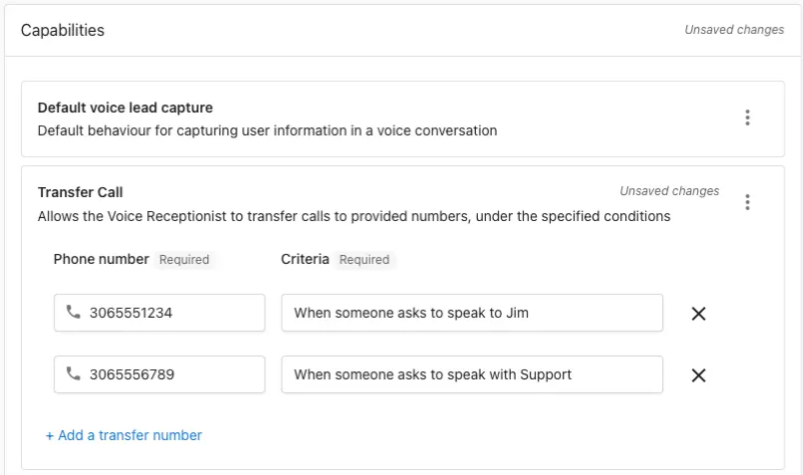
Your AI Voice Receptionist can transfer calls to one or multiple phone numbers based on conditions you set.
To configure this feature, go to:
Business App → AI → AI Workforce → Voice Receptionist → Configure → Capabilities → Add a capability → Transfer Call
With this new capability, you can set routing rules such as:
• Route by Department/Function: e.g., “billing,” “sales,” “support.”
• Route by Employee Name: Perfect for businesses with dedicated client reps.
• Route by Location: Ideal for franchises or multi-location businesses.
• Route by Urgency: Escalate emergency situations quickly.
• Route by Schedule/Time: Send calls to different contacts based on business hours.
• Route by VIP/Account: Recognize key clients and route them to their account manager.
• Route by Language: If a caller requests Spanish (or another language), send them to the appropriate person.
If you'd like this added to your plan, contact Celia and we’ll help you get set up.
FAQs
How many numbers can the AI forward calls to?
There is no limit — you can set up as many transfer numbers as needed.
Can call forwarding work only during specific times or days?
Yes. You can apply conditions based on day, time, or business hours. The AI is aware of the current date and time.
Will the transferred portion of the call be recorded or transcribed?
No. Recording ends at the moment the call is transferred.
If the transferred call isn’t answered, will the AI jump back in?
No. Once the call is transferred, it stays with the receiving number. The caller would need to dial back to return to the AI.
📣 Product Updates: October 22, 2025
Small but mighty improvements have rolled out across several Capital Valley Marketing programs. Depending on your current service plan, you may already have access to these updates.
Small but mighty improvements have rolled out across several Capital Valley Marketing programs. Depending on your current service plan, you may already have access to these updates.
If you see something you'd like added to your agreement, please reach out to Celia — we’ll help you find the best fit for your business.
🤖 AI Workforce
Smarter Lead Capture for AI Chat Receptionist
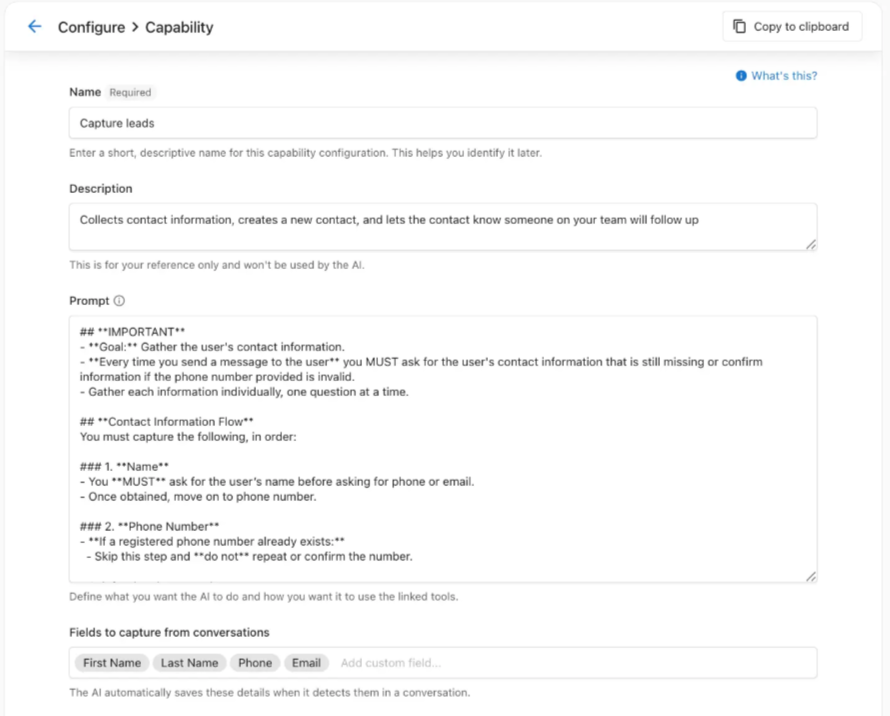
You can now view and edit the default prompt for the Capture Leads capability, giving you more control over how your AI Chat Receptionist gathers lead information.
Collect Additional Lead Details Automatically
Your AI Chat Receptionist can now monitor conversations for extra fields and automatically log them to a Contact record — including custom fields.
Configure this under:
AI Workforce → AI Chat Receptionist → Configure → Capabilities → Capture Leads → Fields to Capture From Conversations
Note: These enhancements are coming soon to the AI Voice Receptionist as well.
If you don't currently use the AI Workforce program and would like to add it, contact Celia.
🧾 CRM
Bulk Actions for Faster Follow-Up
Use Bulk Actions to trigger one-off automation actions across multiple CRM records. This allows you to take actions like:
• Send follow-up campaigns
• Assign leads
• Trigger specific tasks
…without building a full workflow.
Clearer Form Field Mapping
Customize form field names while keeping clear indicators of how each field maps to your CRM.
If you'd like to use your CRM (included in all CVM plans), feel free to reach out to Celia.
📍 Local SEO
Dedicated Tracking for Listings
Assign unique URLs and phone numbers to your Google and Facebook listings to:
• Improve campaign tracking
• Tailor the customer experience
If your plan doesn't currently include Local SEO and you'd like to upgrade, Celia can help.
📣 Social Marketing
Larger Multi-Post Campaigns
You can now add up to 20 posts per campaign, giving you more flexibility when planning multi-post content.
New Instagram Engagement Graph
Track your performance more clearly with updated Instagram engagement metrics.
Expanded Reach Metrics for LinkedIn and TikTok
You can now report post reach for both LinkedIn and TikTok posts.
If you'd like to add Social Marketing to your plan or upgrade your tools, contact Celia.
🗒️ CRM Updates: Faster Actions, Smarter Data, and More Insightful AI Summaries
At Capital Valley Marketing, we’re always working behind the scenes to make sure your marketing systems support steady leads and smoother workflows. The newest CRM updates deliver tighter handling, cleaner dashboards, and AI that reads between the lines instead of skimming the surface.
At Capital Valley Marketing, we’re always working behind the scenes to make sure your marketing systems support steady leads and smoother workflows. The newest CRM updates do exactly that. Think of this release as a tune-up for your digital engine: tighter handling, cleaner dashboards, and AI that reads between the lines instead of skimming the surface.
Below is a quick walkthrough of what’s new and why it matters for your day-to-day operations.
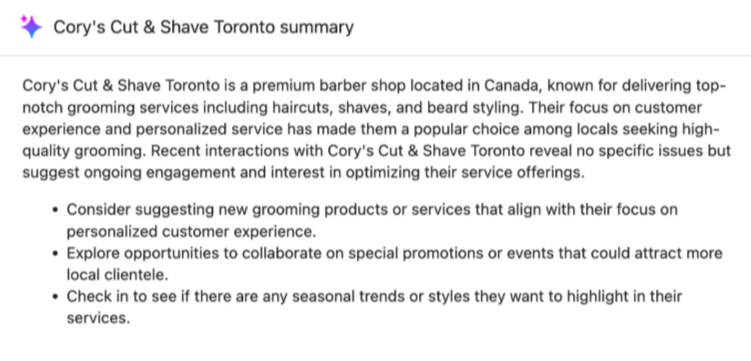
AI Summaries That Actually Feel Human
The “Summarized with AI” feature now pulls from every corner of your CRM’s history, not just the early discovery notes.
What’s Improved
• Clearer, more meaningful client insights
• Better detection of opportunity signals
• A more accurate read on relationship strength
• Summaries that reflect each company’s full story, not snapshots
Why It Matters
You get faster clarity on who needs attention and where opportunities are warming up. It’s like having a relationship radar that helps you prioritize outreach with confidence.
Take More Actions Right From Your Lists
You can now complete more tasks directly from any static or smart list without clicking into individual records.
You Can Now Do in Bulk
• Add tags
• Send SMS messages
• Trigger AI actions
• Create tasks
• Send emails
Why It Matters
This reduces clicks, friction, and mental clutter. Whether you’re nurturing leads or segmenting customers, you move faster, stay organized, and keep your revenue pipeline flowing.
System Views Now Sync Across All Devices
Your customized activity feed settings—filters, display preferences, and more—are now stored in the cloud.
Why It Matters
You get the same clean, familiar workspace whether you're on desktop, laptop, or switching browsers. Less setup, more flow.
Smarter Business Categories for Cleaner Reporting
Generic labels like “Store” or “Restaurant” have been replaced with richer, more accurate categories.
Why It Matters
Better categorization means:
• More precise reporting
• Stronger segmented campaigns
• More accurate AI recommendations and insights
This helps ensure the CRM reflects the real ecosystem of businesses you serve, leading to clearer strategies and better decisions.
If you have questions or want help putting these updates to work inside your lead-generation systems, we’re here and happy to support. After all, running a business is a lot of work; marketing it shouldn’t be.
👍 AI Reputation Specialist Is Here
We’re excited to introduce a powerful new addition to Capital Valley Marketing’s Reputation Marketing services: the AI Reputation Specialist. This new AI-powered tool makes it easier than ever to respond to reviews, stay consistent across platforms, and understand what your customers are really saying—without adding more manual work to your plate.
We’re excited to introduce a powerful new addition to Capital Valley Marketing’s Reputation Marketing services: the AI Reputation Specialist.
This new AI-powered tool makes it easier than ever to respond to reviews, stay consistent across platforms, and understand what your customers are really saying—without adding more manual work to your plate.
The AI Reputation Specialist automatically responds to Google and Facebook reviews and delivers clear, actionable insights through a simple chat experience. It’s designed to help businesses protect their reputation, strengthen visibility, and build trust at scale.
If you’ve ever felt behind on reviews or unsure how feedback fits into your bigger marketing picture, this update is for you.
What’s New
⭐ Automatic, On-Brand Review Responses
Your reviews no longer have to wait. The AI Reputation Specialist can automatically respond to Google and Facebook reviews using messaging aligned with your brand voice and values.
With CVM’s guidance and setup, this helps you:
• Acknowledge every review quickly—even during busy seasons
• Maintain a consistent, professional tone
• Reduce the stress and time spent responding manually
Positive reviews are celebrated. Tough reviews are handled carefully. You stay in control.
💬 Instant Review Insights via AI Chat
Instead of digging through reports, you can now ask questions and get clear answers.
The AI Reputation Specialist analyzes your reviews and feedback to help you:
• Spot early warning signs like sentiment changes
• Identify recurring praise or concerns
• Understand what’s impacting your reputation and visibility
• Make smarter, data-informed decisions faster
It’s insight without overwhelm.
Reputation Marketing, Reimagined
This update reflects CVM’s shift toward AI-enhanced, relationship-first marketing systems. Reputation management isn’t just about collecting stars—it’s about building credibility, trust, and momentum.
With the AI Reputation Specialist, our reputation marketing services help you:
• Build credibility faster with timely, thoughtful review responses
• Understand your customers more clearly through real insights
• Improve local visibility and SEO using feedback themes
• Stay informed without spending hours inside dashboards
White-Glove Setup Available
To make sure you see value right away, Capital Valley Marketing offers a white-glove setup and support option for the AI Reputation Specialist.
This service is ideal for busy, service-based businesses that want it done right the first time.
Our setup includes:
• Custom configuration of your AI Reputation Specialist
• Automated review requests via SMS and email
• Automated AI review responses on Google and Facebook
• Ongoing support for prompts, automations, and feature updates
Recommended for:
Home service businesses, salons, real estate professionals, nonprofits, and any team that wants consistent reviews without extra admin work.
We’ll handle the setup so you can focus on running your business.
A Note on Service Transitions
As part of this upgrade, older manual reputation services will be phased out in favor of this smarter, AI-powered approach. Existing clients will be supported through the transition, and CVM will guide you every step of the way to ensure nothing is lost—and a lot is gained.
In Summary
The AI Reputation Specialist helps you:
• Automatically respond to Google and Facebook reviews with on-brand, reputation-safe messaging
• Understand customer feedback through simple, AI-powered insights
• Strengthen trust, visibility, and SEO with less manual effort
Tired of chasing down new customers every month?
You deserve steady business, not random sales. Your reputation plays a huge role in that—and now, you have a smarter system supporting it.
If you’d like to add the AI Reputation Specialist or want help upgrading your current reputation services, just reach out. We’re happy to help you keep your calendar—and your cash flow—steady all year long.
🌐Upgrading Your AI Receptionist Experience
Celia has personally been the point person for onboarding, configuration, and ongoing support for our AI Receptionist system. That hands-on approach has helped us deeply understand how these tools perform in real businesses, not just in theory.
Up to now, Celia has personally been the point person for onboarding, configuration, and ongoing support for our AI Receptionist system. That hands-on approach has helped us deeply understand how these tools perform in real businesses, not just in theory.
Now, we’re excited to take that experience to the next level.
Moving forward, Capital Valley Marketing is upgrading the AI Receptionist experience by partnering with a dedicated team of AI setup and support specialists.
This means more hands, deeper expertise, and faster refinement—while Celia continues to oversee strategy, alignment, and how this system fits into your broader marketing ecosystem.
Why This Upgrade Matters
AI Receptionists don’t reach their full potential on day one. The magic happens when they’re:
• Tuned based on real conversations
• Refined as customer behavior emerges
• Updated as new product features roll out
With a dedicated support team, we’re now able to:
• Deliver more timely product updates
• Make faster refinements based on real usage
• Build advanced capabilities sooner
• Ensure your AI Receptionist truly feels like an additional team member—not just a chatbot
This upgrade allows CVM to combine human strategy + specialized AI support, giving you a stronger, more reliable system.
What This Means for You
Done-for-You AI Receptionist Setup
Our partner team handles the technical heavy lifting so you don’t have to.
We implement your AI Receptionist for immediate impact, including:
• Tailored workflows
• Custom instructions and capabilities
• Seamless integration with your existing systems
Your front desk becomes automated. Lead capture becomes consistent. And nothing slips through the cracks.
Branded, Personalized, and Built for Your Business
Your AI Receptionist is trained to:
• Match your brand voice and tone
• Answer common questions accurately
• Capture leads correctly
• Route conversations to the right place
It doesn’t sound generic. It sounds like your business.
Who This Is For
This upgraded setup and support experience is ideal for:
• Local service businesses
• Growing teams
• Agencies supporting multiple clients
Especially those who want AI working for them fast, without hours lost to configuration, testing, or prompt tuning.
Beyond Setup: Optimization in the First 30 Days
The first month is where performance really takes shape.
During the first 30 days, our support team:
• Fine-tunes behavior based on live conversations
• Implements advanced capabilities like:
◦ Appointment booking
◦ Inventory lookups
◦ Service-area or zip-code validation
• Connects external systems using open APIs (such as BookMeNow, when applicable)
This ensures your AI Receptionist doesn’t just answer questions—it actively supports revenue.
No Tech Skills Needed. Just Results.
You get:
• A fully configured AI Receptionist
• Backend integration handled for you
• Clear training so your team knows exactly how to use it
• Ongoing refinement without having to ask
From day one, you’ll feel confident that your AI Receptionist is doing its job.
Interested in This Upgraded Experience?
This enhanced setup and support model is something we’re offering moving forward.
If you’re:
• Interested in adding an AI Receptionist
• Curious whether your current setup could benefit from deeper optimization
• Ready for a more hands-off, higher-impact experience
👉 Let us know. We’re happy to walk through what this would look like for your business and see if it’s the right fit.
As always, our goal is simple:
Build systems that support steady leads, smoother operations, and a better experience for both you and your customers.
Capital Valley Marketing Featured on KFBK Morning News: What Local Businesses Need to Know About AI
Last week, I had the opportunity to join KFBK Morning News to talk about a question I hear every day from local business owners:
What does artificial intelligence really mean for small businesses?
The conversation wasn’t about flashy tech or replacing people. It was about how AI is quietly becoming a practical support tool for local, service-based businesses that want to stay responsive, organized, and competitive while still keeping relationships at the center of what they do.
Why this conversation matters right now
AI has become a buzzword, and with that comes a lot of confusion. Many small business owners assume it’s something designed for large corporations with large budgets.
What we discussed on KFBK is the reality I see every day working with local businesses across the Sacramento region: AI is no longer out of reach, and when used intentionally, it can actually reduce stress rather than add to it.
AI as support, not replacement
One of the key points we covered on the show is that AI is not about replacing people or eliminating jobs, especially in small businesses.
For local businesses, AI works best as a behind-the-scenes assistant. It helps handle repetitive tasks like:
Answering common customer questions
Capturing leads when calls or messages are missed
Following up consistently with inquiries
Supporting online reviews and reputation management
These are tasks that often fall through the cracks simply because owners and teams are busy doing the real work of running their business.
What about keeping things human?
A common concern raised in the interview was authenticity. Customers don’t want to feel like they’re talking to a robot, and business owners don’t want to lose their voice.
That concern is valid, and it’s why how AI is implemented matters more than whether it’s used at all.
When AI is trained using a business’s real language, values, and processes, it actually helps maintain consistency and responsiveness while still sounding human. It ensures customers get timely communication without sacrificing personality or trust.
Where small businesses should start
Another takeaway from the KFBK conversation was this: you don’t need to do everything at once.
The best place to start is identifying one pain point:
Missed calls or messages
Slow or inconsistent follow-up
Overwhelming review management
Customer communication pulling focus from core work
Solving just one of these challenges with the right AI support can make an immediate difference.
A local conversation, not a tech trend
Being part of this conversation on KFBK was meaningful because it reflects what many local business owners are already experiencing. AI isn’t the future of small business, it’s part of the present.
When used thoughtfully, it helps local businesses show up more consistently, communicate more clearly, and protect the relationships they’ve worked so hard to build.
If you’re curious about where AI fits into your business, start small, stay human, and focus on support, not replacement.
Authorship Note:
This article was created in collaboration with ChatGPT (AI) and thoughtfully reviewed, edited, and refined by Celia Surridge to ensure accuracy, clarity, and a human touch.
Near-verbatim transcript reconstructed for clarity; minor wording may differ from the original broadcast.
Host:
This morning we’re talking about artificial intelligence and what it really means for local small businesses. Joining us now is Celia Surridge, CEO of Capital Valley Marketing. Celia, good morning.
Celia:
Good morning. Thanks so much for having me.
Host:
So when people hear the term “AI,” especially small business owners, it can feel intimidating. It sounds expensive, complicated, and maybe even a little scary. What are you seeing right now?
Celia:
Yeah, that’s exactly what I hear all the time. AI has become a buzzword, and because of that, people assume it’s something only big corporations can afford or understand. But the reality is, AI has become much more accessible, especially for local, service-based businesses.
Host:
So this isn’t something that’s just for Silicon Valley tech companies anymore?
Celia:
Not at all. What we’re seeing is AI being used very practically. Things like answering customer questions, responding to messages, following up with leads, or even helping manage online reviews. It’s not about replacing people. It’s about supporting small teams that are already stretched thin.
Host:
That’s an important distinction, because I think a lot of people worry about jobs being replaced.
Celia:
Absolutely, and especially in small businesses, that’s not the goal. For local businesses, AI works best as a support system. Think of it as an assistant that helps handle repetitive tasks so the business owner can focus on customers, quality service, and running the business.
Host:
Can you give an example of how this shows up locally?
Celia:
A big one is customer communication. Many small businesses miss calls or messages simply because they’re busy working. AI can step in to answer common questions, capture contact information, and make sure that potential customers don’t get lost. That alone can have a huge impact on revenue.
Host:
What about concerns that AI makes things feel robotic or impersonal?
Celia:
That’s a very valid concern, and it really comes down to how AI is set up. When it’s trained properly and aligned with a business’s voice and values, it actually helps maintain consistency and responsiveness while still sounding human. It’s not meant to replace real conversations, just support them.
Host:
If someone is listening right now and feeling overwhelmed, where should they start?
Celia:
Start small. Look at one pain point. Maybe it’s missed calls, slow follow-ups, or managing reviews. You don’t need to overhaul everything at once. Solving just one problem with the right AI tool can save hours each week and reduce a lot of stress.
Host:
Do you think AI is becoming necessary to stay competitive?
Celia:
In a practical sense, yes. Customer expectations have changed. People expect quick responses and easy communication. AI helps local businesses meet those expectations while still keeping their personal touch. It levels the playing field.
Host:
Great insight. Celia Surridge with Capital Valley Marketing. Thanks so much for joining us this morning.
Celia:
Thank you. I really appreciate it.
Why Local SEO Is the Secret Weapon for Sacramento Service Businesses
Let’s be real - running a small business (let alone a service-based business) is a lot of work. You’ve got customer service, managing staff, and keeping operations running smoothly all on your mind every second of every day. The last thing you want to think about is marketing. But when it boils down to it, if your business isn’t showing up online, you’re missing out on a steady stream of local customers.
That’s where focusing on your website’s local SEO (search engine optimization) comes in — and it might just be the most powerful, cost-effective tool in your marketing toolkit.
What Is Local SEO?
Local SEO is the process of optimizing your online presence so people in your area can find you when they’re searching for services you provide (LSEO, n.d.). Think about it: when someone types “plumber near me” or “best landscaper in Sacramento” into Google, local SEO determines whether your business shows up on that first page — or gets buried in the results.
Why It Matters for Sacramento Service Businesses
Your customers are searching online first.
Even for word-of-mouth referrals, people still Google a business before calling. If you’re not visible, you’re not credible.Competition is growing.
Sacramento’s small business community is thriving, which means more people are competing for the same customers. Local SEO helps you stand out.It’s cost-effective.
Unlike traditional ads, SEO keeps working long after the initial setup. When you’re listed correctly and consistently, customers keep finding you.
How Local SEO Works
Google Business Profile: Claiming and optimizing your profile is step one.
Citations: Consistent business information (name, address, phone) across online directories.
Reviews: Positive reviews increase trust — and rankings.
Content: Adding local keywords to your website helps Google match you to searches in Sacramento.
The Bottom Line
Local SEO is the digital version of having the most significant, brightest sign on the busiest street in town — except it works 24/7.
If you’re ready to stop missing out on local customers and start building your online presence, our Marketing Packages are designed for you. It includes Local SEO & Citation Builder Service, plus ongoing support so you don’t have to manage it alone.
Learn more about our Marketing Packages and schedule a consult call with us today!
Authorship Note:
This article was created in collaboration with ChatGPT (AI) and thoughtfully reviewed, edited, and refined by Celia Surridge to ensure accuracy, clarity, and a human touch.
Citations:
LSEO. (n.d.). Local SEO for Video: Connect with Your Local Market [Blog post]. Retrieved September 9, 2025, from https://lseo.com/seo-services/local-seo/local-seo-for-video-connect-with-your-local-market/